
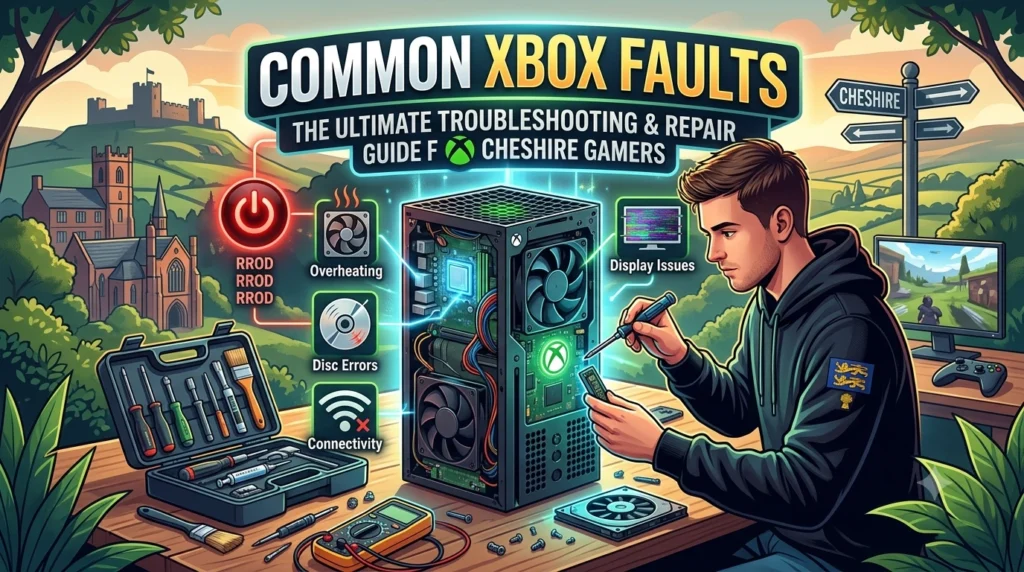
Common Xbox Faults: The Ultimate Troubleshooting and Repair Guide for Cheshire Gamers
There is nothing quite as frustrating as sitting down for a weekend gaming session, hitting the power button on your Xbox, and being met with total silence, a flashing light, or a completely blank screen. Whether you are rocking an older Xbox One or the flagship Xbox Series X, these powerful consoles are prone to hardware wear and tear over time.
At Macc Tech Repair, we see dozens of consoles come through our workshop doors every week. Based right here in Macclesfield, Cheshire, we help gamers get back online fast. Whether you are local to Macc or visiting us from surrounding towns like Wilmslow, Congleton, Prestbury, Alderley Edge, Bollington, or Knutsford, this guide breaks down the most common Xbox faults, how you can troubleshoot them at home, and when it is time to bring it in for a professional fix.
1. The Console Won’t Turn On (No Power / Single Beep)
One of the most alarming Xbox faults is a console that appears completely dead. You press the power button, and either absolutely nothing happens, or the console emits a single, sad beep and immediately shuts down.
What Causes It?
- Internal Power Supply Unit (PSU) Failure: Severe power surges, electrical component wear, or dust build-up can kill the internal PSU.
- Motherboard Short Circuit: Damaged voltage regulators, faulty capacitors, or unexpected liquid exposure will cause the console to detect abnormal current. To protect itself from catching fire, the system blocks the startup sequence entirely.
Home Troubleshooting Steps
Before you panic, try a hard power cycle:
- Disconnect the power cable completely from the back of your Xbox.
- Wait at least 60 seconds to allow any residual energy to discharge from the capacitors.
- Plug the cable directly into a mains wall socket (avoid extension leads or surge strips for this test).
- Remove any external hard drives or USB accessories, then try turning it on.
If your console still refuses to boot, the issue is almost certainly hardware-based, requiring internal power rail testing.
2. The Dreaded “Black Screen of Death” (HDMI Port Issues)
You can hear the console power up, the fan starts spinning, and your controller connects perfectly—but your TV screen says “No Signal” or stays entirely black.
What Causes It?
The HDMI ports on modern consoles, especially the Xbox Series X, are notorious weak points. Because the console is heavy, pulling a trailing cable or dropping the unit even a few inches while plugged in can instantly break the internal delicate pins away from the motherboard. In other cases, the internal HDMI retimer chip or an integrated circuit controller fails, stopping the video signal from processing properly.
Pro Tip to Avoid HDMI Damage: Keep your console low to the ground in a dedicated space. Never move or pack up your Xbox while the HDMI cable is still plugged into the back!
If a new HDMI cable or testing on a different TV does not fix the issue, you will need a professional micro-soldering repair to replace the broken port. You can read more details about our specialized hardware diagnostic processes on our Gaming Console Repairs page.
3. Constant Overheating and Sudden Shutdowns
Are you in the middle of an intense multiplayer match when your Xbox suddenly cuts out without warning? When you boot it back up, do you get an on-screen warning telling you the console has shut down to protect itself from overheating?
What Causes It?
Consoles function like miniature vacuum cleaners; they constantly pull air inside to keep the internal chips cool. Over time, household dust, pet hair, and debris clog up the heatsink and cooling fans. Compounding this, the factory-applied thermal paste (which transfers heat away from the main processor) dries up, cracks, and loses its efficiency after a few years of heavy use.
When to Seek Help
Cleaning out the outer vents with canned air can provide temporary relief, but if the internal heatsink looks like a lint roller, the console must be safely disassembled, thoroughly cleaned, and treated with premium-quality replacement thermal paste to protect the processor from permanent thermal degradation.
Useful Video Walkthroughs for Xbox Faults
To see what these common faults look like under the hood, check out these highly informative video diagnostics from experienced repair specialists:
- Top 5 Common Xbox Faults & Explanations: Watch how components break down over time in this Xbox One Top 5 Problems Video Guide.
- Deep Dive into No Power Diagnostics: If your console is dead, see the internal hardware repair breakdown via the Xbox One No Power Repair Tutorial.
4. Disc Drive Errors & Read Failures (Xbox One & Series X)
If your console rejects discs, makes a horrific grinding clicking noise when you slide a game in, or simply says “Disc Unreadable” for every piece of media you insert, the optical drive is failing.
What Causes It?
Optical drives have physical moving parts, making them highly susceptible to mechanical wear. The internal laser lens can accumulate dust or burn out entirely over time. Additionally, the small gears and rollers that pull the disc inside can easily become misaligned, especially if a young gamer accidentally pushes two discs into the slot at once!
Why Choose Macc Tech Repair?
While we love an eager DIY approach, modern video game consoles are highly sophisticated machines. Opening them up without the proper safety equipment, anti-static protocols, and micro-soldering tools can easily turn a simple repair into a permanently dead “brick.”
At Macc Tech Repair, we provide expert diagnostics and reliable fixes for all electronics—ranging from Computer and Laptop Repairs to Mobile Phone Screen Fixes and complex gaming console board work. We proudly serve our local community across Macclesfield and the wider Cheshire region.
- Location: Macclesfield, Cheshire
- Call Us Directly: 07386 374476
- Get a Quick Quote: Drop by our workshop or reach out via our Contact Us Page.
Don’t let a hardware fault keep you out of the game. Get in touch with our friendly team today!
/